

Your profile settings help shoppers get to know the person behind the products. Here's how to fill out each field in the About You section.
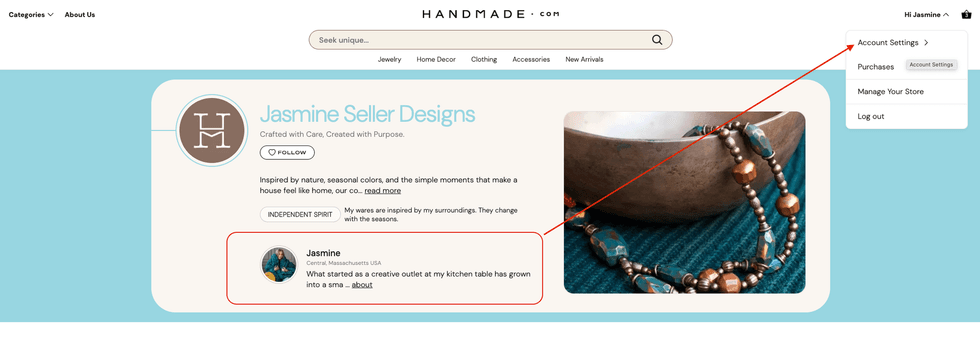 Updating your Profile Settingshandmade.com
Navigate to the Account Settings page from your profile menu.
- Click your name in the top-right corner of the page
- Select Account Settings from the dropdown menu.
- In the left sidebar, click "About you" under Account settings.
Profile photo
This image appears next to your name whenever you leave a comment or interact with buyers on the platform. Choose a clear, well-lit photo where your face is easy to recognize — a friendly, approachable image helps build trust with shoppers.
Accepted formats: .PNG, .JPG, or .GIF only. Images cannot be larger than 20MB.
First, Last & Display Name
Your name fields control how you are identified both internally and publicly on the platform. Your first and last name are for your account only and are not shown to shoppers. Your display name is what appears publicly — this can be your shop name, a nickname, or your full name.
My Story
This appears on your public profile and is your opportunity to tell people who you are and what drives your craft. Share how you got started, what inspires you, and what makes your work special.
Shoppers on Handmade.com are looking for authentic, human stories behind the products they buy. Be personal, specific, and genuine — your story is one of your most powerful selling tools.
Quick Intro (one-liner)
A short one-liner that appears as a brief summary of who you are on your profile. Think of it as your personal tagline — a punchy, memorable phrase that captures your style or mission.
Location
Your location is displayed on your public profile and helps shoppers connect with makers in their region. We recommend including your city, state and country.